True View Ecommerce Impressions With Google Tag Manager

Last updated 9 October 2020: customTask updated to a more stable version.

I’m a big fan of Enhanced Ecommerce in Google Analytics. In fact, I think it’s the only valid way to deploy Ecommerce tracking today, especially when using Google Tag Manager. The ability to use a Custom JavaScript variable and the possibility to tackle the full ecommerce funnel are some of the benefits of using Enhanced Ecommerce.

However, tracking certain view-based events, impressions in particular, has a significant problem when it comes to how Google Analytics processes events. In a nutshell, when implemented by the book, impressions are sent for all the product impressions on the page when the page is loaded. In other words, you are collecting hits from impressions the user might not actually have seen.

Read More…

#GTMTips: Trigger Javascript Function Without Using a Custom HTML Tag

Last updated 9 October 2020: customTask updated to a more stable version.

The Custom HTML tag in Google Tag Manager is splendid. It’s your go-to tool when you need to run arbitrary JavaScript on the webpage. Some might even use it to actually add HTML elements to the page, but I’m willing to bet running JavaScript is its most common use.

However, there’s a downside to Custom HTML tags, which is only made more apparent on single-page apps which do not clear the full page when transitioning from one state to another. Custom HTML tags are injected to the end of <body>, which means you might end up with a lot of clutter in your Document Object Model.

Read More…

#GTMTips: Use Product-Scoped Custom Dimensions in GA Firebase

Thanks to the intrepid detective work of Jørn Reidel and Ahmed Marof, it looks like one of the big hurdles for doing a full migration from using the legacy Google Analytics and Google Tag Manager SDKs to the latest Tag Manager + Firebase SDK is now a non-issue.

The issue is, of course, Product-scoped Custom Dimensions or more specifically the lack of support thereof. Until now, I’d been holding against recommending the migration to anyone with Enhanced Ecommerce tracking set up simply because the documentation didn’t mention the possibility of sending these custom definitions to Google Analytics.

Read More…

Obfuscate and Duplicate Google Analytics Data

Perhaps you didn’t know this, but there’s a really handy demo account for Google Analytics you can use to check out how Google Analytics works in a real business context (the data is from the Google Merchandise Store). However, you can access the account with nothing more than read-only access. This is annoying if you wanted to customize the setup.

Worry not, I have a solution for you! Harnessing the awesome power of customTask, you can create a duplicate of the data collected on any website where you can modify the tracking (e.g. via Google Tag Manager). Even better, the data will be obfuscated using a dictionary of English words (you can edit this list), and hashing each string in the payload predictably against this dictionary.

Read More…

Prevent Duplicate Transactions in Google Analytics With CustomTask

One of the big problems in Google Analytics’ data model is the immutability of historical data. Once a row of data is written into the data table, it is there practically for good. This is especially annoying in two cases: spam and bogus ecommerce hits. The first is a recognized issue with an open and public data collection protocol, the latter is an annoyance that can explode into full-blown sabotage (you can use the Measurement Protocol to send hundreds of huge transactions to your competitor’s GA property, for example).

Read More…

How to Unset a User-Scoped Custom Dimension in Google Analytics

Scope in Google Analytics’ Custom Dimensions refers to how the value in the Custom Dimension is extended to all hits in the same scope.

Hit- and product-scoped Custom Dimensions apply to the given hit alone - they are not extended to any other hits in the session or by the same user.

Session-scoped Custom Dimensions apply the last value sent during the session to all the hits in that session.

User-scoped Custom Dimensions apply the last value set during the session to all the hits in the session AND to all future hits by the same client until a new value is sent.

Read More…

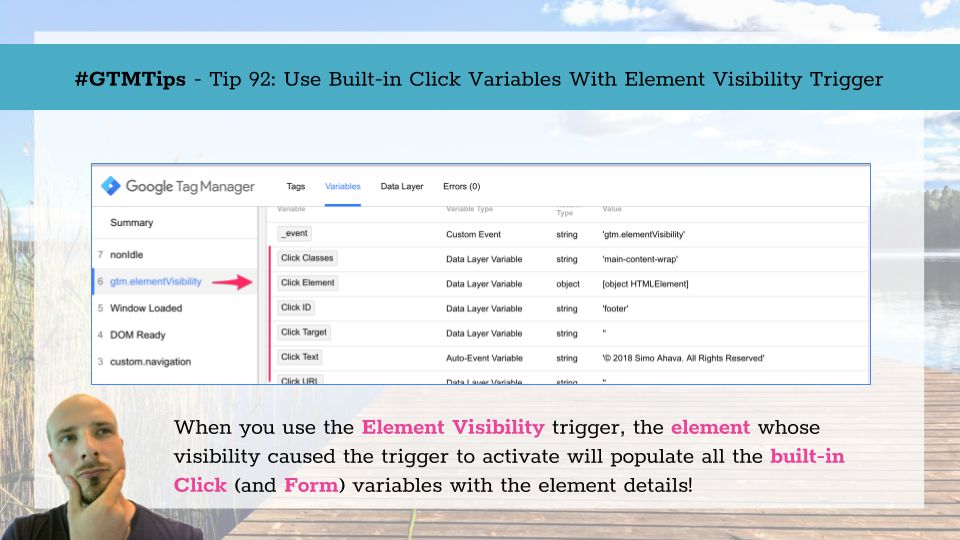
#GTMTips: Use Click Variables With Element Visibility Trigger

If you are enjoying the Element Visibility trigger as much as I am, you’ll be glad to know of a very simple tip that might make your life easier when using Google Tag Manager.

The tip is this: If you’ve activated the built-in Click variables, they will be automatically populated with details about the element that caused the Element Visibility trigger to activate!

Tip 92: Use Built-in variables to analyze the visible element

Yes, it’s confusing they’re still named Click variables, especially since they’re duplicated in the Form variables, and even more so since they can be used with the Element Visibility trigger to identify which element became visibility.

Read More…

Install Snowplow on the Google Cloud Platform

Last updated 18 Jan 2019: Added details about the free tier limitations, and showed how to avoid the Dataflow jobs auto-scaling out of control.

I’m (still) a huge fan of Snowplow Analytics. Their open-source, modular approach to DIY analytics pipelines has inspired me two write articles about them, and to host a meetup in Helsinki. In my previous Snowplow with Amazon Web Services guide, I walked you through setting up a Snowplow pipeline using Amazon Web Services. This time around, I’m looking at the wondrous Google Cloud Platform, for which Snowplow introduced support in an early 2018 release.

Read More…

Google Analytics for Mobile Apps Getting Shut Down

If you’re a user of the free version of Google Analytics, and if you have a free Google Analytics property collecting hits exclusively from the Google Analytics Services SDK (Android or iOS), you might have recently received an email that looks like this (emphasis mine):

In a nutshell, Google is now starting the process of deprecating the “legacy” Google Analytics for Mobile Apps. This covers all data collection SDKs that do not have the word “Firebase” in them. As such, also the “Google Analytics” tags in Google Tag Manager for mobile apps will be impacted.

Read More…

Persist Google Tag Manager's DataLayer Across Pages

UPDATE 4 June 2020: Instead of copying the Custom HTML code from the article, please load it from the GitHub Gist instead.

Four years ago, I wrote an article on how to persist GTM’s dataLayer from page to page. Unfortunately, the solution was a bit clumsy, requiring you to give specific commands for the interactions, which made it really unwieldy in the long run. Google Tag Manager still doesn’t offer us a native way to persist the dataLayer array or its internal data model from one page to the other, so I thought it was about time I revisit this idea.

Read More…