Definition of Success

Agile analytics isn’t a novel concept in any shape or form. Things like feedback loops and process-oriented development seem to integrate flawlessly into the analytics paradigm, at least on paper. Heck, there’s even the Build-Measure-Learn framework for continuous development. It would be difficult to argue that analytics doesn’t have a role in something with measure in the name!

However, past three years of working at Reaktor, one of the world’s top agile technology houses, have introduced me to a whole new set of problems with integrating an “analytics mindset” into an agile workflow, or an “agile mindset” into the analytics process.

Read More…

Definition of Success

Agile analytics isn’t a novel concept in any shape or form. Things like feedback loops and process-oriented development seem to integrate flawlessly into the analytics paradigm, at least on paper. Heck, there’s even the Build-Measure-Learn framework for continuous development. It would be difficult to argue that analytics doesn’t have a role in something with measure in the name!

However, past three years of working at Reaktor, one of the world’s top agile technology houses, have introduced me to a whole new set of problems with integrating an “analytics mindset” into an agile workflow, or an “agile mindset” into the analytics process.

Read More…

Guide to Zones in Google Tag Manager 360

Last updated 13 March 2024: Clarified that you can add a trigger like Initialization – All Pages as a Custom Evaluation to give the Zone full access to page state.

Google Tag Manager supports loading multiple containers on the same page. It’s useful if you have multiple companies or organizations working on the same site, but for one reason or another (e.g. governance) you want to restrict access to your main container. In these situations, having the other party create their own container and adding it to the site is the best of bad options.

Read More…

#GTMTips: Check Container ID With EventCallback

When you use the dataLayer.push() command on a page with a Google Tag Manager container, you pass information to GTM’s internal data model and potentially fire tags (if the push() contained an event key). You can also add the eventCallback key to these pushes. The value of this key should be a function, and this function is then executed once the container finishes processing any tags that might have fired on that dataLayer.push().

This is useful if you want to give Google Tag Manager time to complete its operations before proceeding with other actions on the page, for example.

Read More…

Customize the Scroll Depth Trigger in Google Tag Manager

Last updated 9 March 2018 with some new tips.

The Scroll Depth trigger in Google Tag Manager has a lot going for it. Tracking how far users scroll down a given page has long since been recognized as an important cog in the engagement tracking machine, and there have been really great solutions for implementing scroll depth tracking for web analytics over the years.

With Google Tag Manager’s native Scroll Depth trigger, it’s tempting to think we now have a be-all end-all solution that covers all the bases. However, as with everything else in analytics, the native scroll depth trigger does require customization to provide you with relevant information about your content and the visitors interacting with it.

Read More…

#GTMTips: Add HTML Elements to the Page Programmatically

One of the annoying quirks of Google Tag Manager is that it strips out any non-standard HTML attributes from elements you add to Custom HTML tags. I’m using “non-standard” as a qualifier here, because I don’t have an exhaustive list of attributes that are ignored. But at least data attributes (e.g. data-id) and attributes with custom names (e.g. aria-labelledby) are either stripped out upon injection, or GTM might actually prevent you from even saving the container if the Custom HTML tag has elements with these attributes.

Read More…

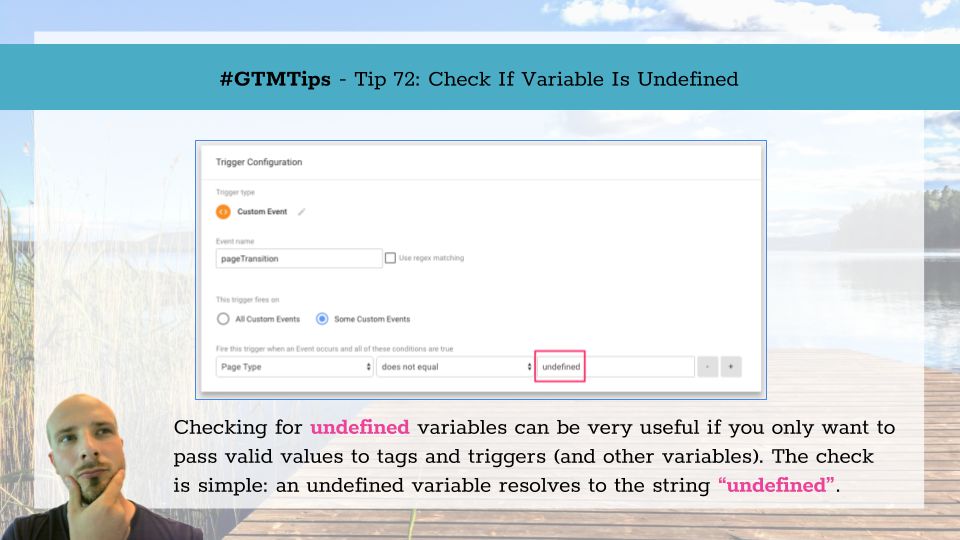
#GTMTips: Check for Undefined Value

This is one of those #GTMTips posts that I was certain I’d already written. So it came as a mild surprise when I realized I’d never tackled this aspect of Google Tag Manager.

It’s a short and sweet tip again. Today we’ll learn how to check if a variable is undefined using Google Tag Manager.

Tip 73: Check for undefined variable values

If a variable is undefined, it means that a variable with the given name does not currently have any valid value in memory. In JavaScript, the typical check for undefined is done like this:

Read More…

CustomTask - The Guide

Last updated 4 September 2018

If you have been reading my blog articles over the past year, you might have noticed a disturbing trend. I’ve published 9 articles on customTask since the API was released. It might not sound like much, but I can’t think of a single feature in Google Analytics or Google Tag Manager that has so completely convinced me of its usefulness in such a short time.

The customTask API is a feature of the Universal Analytics library (used by Google Tag Manager’s tags, too). It lets you get and set values from and to the (Measurement Protocol) hit as it’s being generated. This is really useful for a couple of reasons, which I’ve covered in the previous articles, but I’ll go over them briefly in the beginning of this guide, too.

Read More…

#GTMTips: Edit Google Analytics Tag Settings

When the Google Analytics Settings variable was introduced in May 2017, it resulted in a significant change in the Google Analytics tag user interface in Google Tag Manager. The default UI for editing a tag was stripped down of all GA-specific settings, and the new Google Analytics Settings drop-down was the replacement.

Unfortunately, the bulk of Google Tag Manager articles online (including those on this blog) still refer to the old interface in screenshots and instructions. This #GTMTips article is a very quick tip to show you how to reveal tag-specific settings without using a Google Analytics Settings variable.

Read More…

#GTMTips: Fix Missing Page View Event and Broken Triggers

Google Tag Manager should be relatively easy to implement. Just paste the container snippet to the <head> of the page and you’re good to go! However, at some point you’ll want to configure the dataLayer structure, too (read more about dataLayer here). There are two ways to do it: the right way and the wrong way.

In this article, we’ll see what happens if you do it the wrong way, how to identify the issue, and how to fix it.

Read More…

Snowplow: Full Setup With Google Analytics Tracking

A recent guide of mine introduced the Google Analytics adapter in Snowplow. The idea was that you can duplicate the Google Analytics requests sent via Google Tag Manager and dispatch them to your Snowplow analytics pipeline, too. The pipeline then takes care of these duplicated requests, using the new adapter to automatically align the hits with their corresponding data tables, ready for data modeling and analysis.

While testing the new adapter, I implemented a Snowplow pipeline from scratch for parsing data from my own website. This was the first time I’d done the whole process from end-to-end myself, so I thought it might be prudent to document the process for the benefit of others who might want to take a jab at Snowplow but are intimidated by the moving parts.

Read More…