Google Tag Manager Sonar V1.2

That’s right, I changed the name! Huge thanks to Paul Gailey for the inspiration.

Get the latest version of GTM Sonar here.

Just a minor update this time. I added some informative text to the pop-up, along with an error screen if something goes wrong.
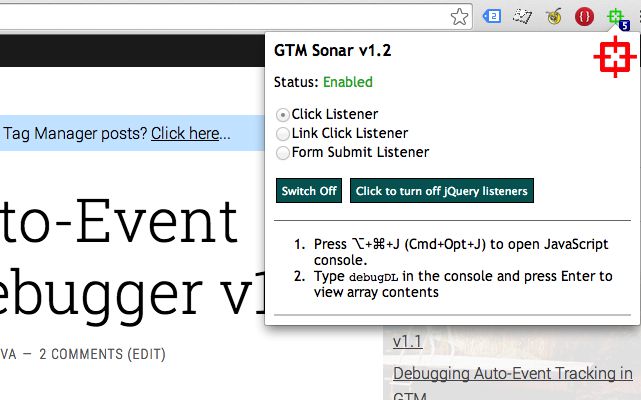
Another change is that now when an element is added to debugDL, a counter on the Browser Action icon will start climbing, representing the number of objects in the array. Cool!

Read More…

GTM Auto-Event Listener Debugger V1.1

(Last updated June 2014: Read the latest post on the extension, GTM Sonar v1.2.)

I updated my Chrome Extension, GTM Auto-Event Listener Debugger v1.1. I released the first version a couple of days ago. The extension can be used to debug Google Tag Manager’s auto-event tracking and its compatibility with web page markup.

Download the latest version here.

I did some major changes, and here’s the rundown.

  1. I transferred all debugger actions into a pop-up, which opens when you click the Browser Action. The debugger is still tab-specific, so it can have different states in different tabs. Also, The Browser Action still turns green when the debugger is enabled for current tab.

    Read More…

Debugging Auto-Event Tracking in GTM

(Last updated June 2014: Read the latest post on the extension, GTM Sonar v1.2.)

Many of the Google Tag Manager articles on this blog could be considered hacks, in that they extend the out-of-the-box features of GTM in ways that will surely not be officially supported by Google. The crux of the problem is that lots of folks are taken by surprise when GTM refuses to work properly on their site, or when they have trouble tracking key elements on the page template.

Read More…

Simple Split Test With Google Tag Manager

Over the last couple of posts I’ve mainly been doing proof-of-concept (POC) tests with Google Tag Manager. The great thing about a POC is that you don’t really need to have any viable results or insight-driving technological innovations. The point is to showcase some feature of the platform on which the experiment was conducted.

In this post, I’ll take a care-free step into the world of POCs again. My goal is to do a simple split test in order to identify which variant of a landing page (or key element thereof) produces the most conversions.

Read More…

Send Mail Upon Google Tag Manager Event

Let’s say you want to set up a rudimentary email alert system in your Google Tag Manager implementation. Say, for example, you want to receive an email every time an uncaught error occurs on your website. It’s not a very good use case, since a large website can spawn hundreds of uncaught exceptions in a short period of time, but let’s just pretend for now.

If you know your JavaScript, you’ll know that you can’t send mail using client-side code. That’s a browser security thing, and I completely understand it. However, a vast majority of websites are created using a CMS which might provide some mail function or hook for you to use. And even if you don’t have a cooperative web server (or there’s no way you can persuade your developers to help), you could use any one of the online email APIs that are out there.

Read More…

Google Tag Manager: DOM Listener

In this post, I’ll walk you through a tutorial on how to create a Google Tag Manager extension. This extension will be a new listener, whose sole job is to listen for changes in the HTML and CSS markup on the page.

The reason I’m teaching you how to create a DOM listener is simple. Ever so often I come across people asking for help, but they are unable to touch on-page code. Usually the problem is magnified with form handlers, since the developers might have installed some custom jQuery form manager, for instance, which simply refuses to cooperate with GTM’s form listeners. That is why you might want to fire a GTM event when a certain message pops up on the screen, for example.

Read More…

Accuracy Test of GTM Default Events

If you know your Google Tag Manager, you know that GTM pushes three data layer events into the queue when any page with the container snippet is rendered. Each of these three events signals a specific stage in the page load process. Here are the events (be sure to read my guide on GTM rules to understand further what these events do):

  • gtm.js - This is pushed into the data layer as soon as GTM is initialized and the container is loaded. This is also the default event for all rules without an explicit event macro rule as a condition. Basically, if you want something to happen at the earliest possible moment, you need to have {{event}} equals gtm.js as the rule

    Read More…

Advanced Form Tracking in Google Tag Manager

There is a new, updated version of this article for the new version of Google Tag Manager. I strongly suggest you read that as well!

I really enjoy the ad hoc Q&A sessions my blog posts have inspired. I haven’t said this enough, but I am really, REALLY grateful to people who take their time to comment on my posts, even if it’s just say a quick “Hi!”. The main reason I enjoy getting blog comments is because they often turn into blog posts. Seriously, if you’re a blogger suffering from writer’s block, take a look at your comments. There’s a wealth of content ideas right there.

Read More…

Macro Magic for Google Tag Manager

(Last updated June 2014) This post is an attempt at a whole new level of interaction. These words will transcend the barriers of time and space, bridging together the physical world and its digital counterpart. You see, in an undisclosed number of hours after the publishing of this blog post, I will be talking at the MeasureCamp unconference on this very subject. Or, I hope I will. The whole unconference thing is somewhat confusing, and it involves lighting-fast reflexes and street smarts for slot selection; traits which I sadly lack.

Read More…

The Container Snippet: GTM Secrets Revealed

First of all, I’m sorry for the wacky title. Sometimes I just want to amuse myself. Nevertheless, this post is about the Google Tag Manager container snippet. There’s nothing secretive about it, but I’m betting many people have no clue what the snippet really does. That’s the revelatory part.

If you’ve never wondered what the snippet does, then shame on you! Remember, you own your page template. It’s yours. Any code that you write there is your responsibility. You wouldn’t let a complete stranger come to your house and paint your walls without permission, would you? So why copy-paste some code that you have no idea what it does? Because Google told you to?

Read More…