Improve Data Collection With Four Custom Dimensions

Since writing my rant about the schema conspiracy of web analytics platforms, I’ve been giving the whole idea of hit-level data collection a lot of thought. Sessionization is very heavily implemented in Google Analytics, which is understandable, but the regular Google Analytics API just doesn’t give you the kind of information you’d need, if you wanted to stitch hits together differently in your own backend. In fact, there are four distinct levels of aggregation that are not exposed via the API, even though I think they should:

Read More…

Send Weather Data to Google Analytics in GTM V2

In 2013, I wrote a guide for Universal Analytics and Google Tag Manager on how to poll for weather conditions, and send this information to Google Analytics as a custom dimension of the session. The guide was intended as a technical introduction to Google Tag Manager, and I think it succeeded in that.

However, GTM has changed a lot over the last 1.5 years, and I’ve made some improvements to the method along the way. So I wanted to update the guide for the new version of Google Tag Manager (V2), and introduce some changes to the code that make it more flexible and efficient.

Read More…

The Schema Conspiracy

A schema is something that data processing platforms such as Google Analytics apply to the raw hit data coming in from the data source (usually a website). The most visible aspect of Google Analytics’ schema is how it groups, or stitches, the arbitrary, hit-level data coming in from the website into discrete sessions, and these are actually grouped under yet another aggregate bucket: users.

But you already know this. You’re looking at metrics like Sessions, Bounce Rate, Conversion Rate, and you’re using them or variations of them as KPIs in your dashboards and whatnot. Right?

Read More…

"Matches CSS Selector" Operator in GTM Triggers

Be honest, can you think of anything that’s more unfair than this:

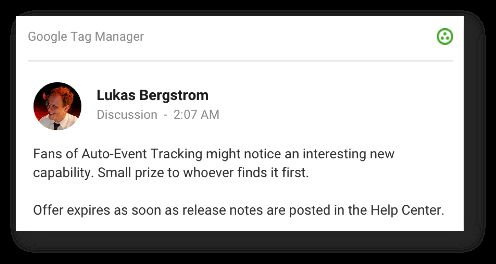
A new Google Tag Manager feature, published at 02:07 AM my time, and with an easter egg hunt involved?! Of course it was the infuriating Charles Farina who found the new feature and claimed the prize. Curses! (Just kidding Charles, you’re still awesome.)

Anyway, there’s a new GTM feature in town, and oh boy, this time it’s a big’un! Without further ado, allow me to introduce a new Trigger operator - the matches CSS selector:

Read More…

Leverage UseBeacon and Beforeunload in Google Analytics

This nifty little solution will let you calculate the time spent on pages that are not tracked in Google Analytics by default. These include both bounced landing pages and exit pages. Bounced pages and exit pages lack the necessary subsequent pageview, which Google Analytics uses to calculate time-based metrics.

Before you go on, read this excellent article by Yehoshua Coren:

REAL Time On Page in Google Analytics

Yehoshua gives a very nice use case for the technical solution I’m about to explore. He also leverages the Page Visibility API to get an even more accurate overview of visitors who actually digest content, and how much of that time that content is visible on their screens. Fundamental stuff, read it!

Read More…

Track Non-JavaScript Visits in Google Analytics

One of the big mysteries in browser-based data collection platforms like Google Analytics is what happens when the visitor is not being tracked. This is most obvious in cases where the user explicitly opts out of tracking, when the user does not have JavaScript active in their browser, in bounced sessions, and on exit pages.

Opt-outing means that the user explicitly prohibits a website from tracking them. In some cases, it’s possible that opt-out is the default, and the user must explicitly opt-in to allow GA to record their visits. In this article, I will of course not give you ideas how to circumvent this, as you must respect the user’s wishes.

Read More…

RELEASE: GTM Tools V2.0

(UPDATE 3 Apr 2017: There is a newer version of GTM Tools out, so please ignore this article and read this one instead.)

So, the time has come to update my GTM Tools. I released the first toolset in October 2014, and it performed its duties just well enough. Sure, the UI was ugly as hell, and there were bugs along the way, but for cloning containers, macros, and rules, and for visualizing containers, it was just good enough.

Read More…

Enrich SERP Results Using GTM

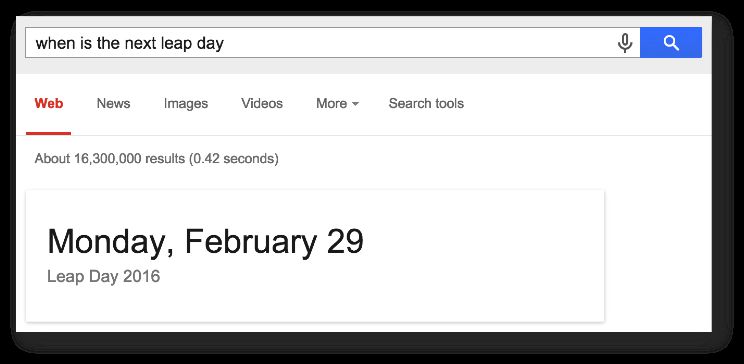
Google has a myriad of ways to make the search engine results page (SERP) livelier. When you input a search query, the engine’s mission is to provide you with the most relevant information with as few clicks as possible. Often, this means that you’ll see the answer to your query directly in the SERP:

See also Dr. Pete’s excellent description of variation in the SERP (note that this post is from 2013, and not all the data types are relevant today). As you can see, there are many ways for a site to annotate data found within, and that way provide it for Google to utilize if it so chooses. There’s no guarantee that your structured data is picked up by the search engine, but that shouldn’t deter you from marking up your content anyway.

Read More…

Variable Guide for Google Tag Manager

(Updated 21 February 2019)

The current version of Google Tag Manager was released in October 2014. With the release, we saw a brand-spanking new UI, a lot of new functionalities (revamped auto-event tracking, for example), plus a new terminology to cope with. We moved away from the programming-centric concepts of Macros and Rules to the more tactile variables and triggers.

It’s difficult to rank the changes. The new Auto-Event Tracking is perhaps most impactful, but the improvements done to triggers and variables, when compared to the previous version of GTM, require attention as well.

Read More…

Track Content With Enhanced Ecommerce

My fingers have been tingling to write this article. Ever since I implemented Enhanced Ecommerce on my blog a couple of weeks ago, I’ve been getting such an impressive amount of useful data that it’s mind-boggling.

In this article, I’ll walk you through the steps I went to implement the solution, along with examples of the data I can now access through Google Analytics’ reporting interface. As you might have guessed, if you’ve read my articles before, I implemented Enhanced Ecommerce with Google Tag Manager. Note, this is not a step-by-step guide, but should rather provide inspiration for you to think out-of-the-box when it comes to Google Analytics’ features.

Read More…