Site Speed Sample Rate and Multiple Page Views

Google Analytics’ Site Speed reports are pretty darn great. They report automatically on various milestones in the process the browser undertakes when rendering content. These reports leverage the Navigation Timing API of the web browser, and they are (typically) collected on the first Page View hit of a page.

And this is all fine. As I said, it’s a great feature of Google Analytics, and lends itself handily to spotting issues in the quite complex client-server negotiation that goes on when your web browser requests content from the web server.

Read More…


Introducing GA Spy for Google Analytics

This is a guest post by Stephen Harris from Seer Interactive . He was kind enough to share his awesome solution in this blog, so I’m very grateful indeed for his contribution.

If Google Tag Manager is loaded as the primary instrument for tracking on a webpage (as it should be), then all webpage tracking could and should be configurable via GTM. But we don’t always control the circumstances, and it’s not uncommon to face hardcoded Google Analytics tracking outside of GTM.

Read More…

10 JavaScript Concepts for Web Analytics Implementation

I’ve already written extensively about JavaScript in web analytics implementation. Suffice to say, understanding at least the basics is absolutely necessary to survive in the technical medium of the web browser.

This article expands on a conference talk I gave at MeasureCamp IX, London a short while ago. I’ve always been quite single-minded about the importance of JavaScript in web analytics development, and it was a pleasure for me to get some of that off my chest. So I want to go over the ten concepts introduced in my conference talk with a little more detail, especially in the context of Google Tag Manager.

Read More…

Revamped User Interface in Google Tag Manager

It’s been a crazy week. Just crazy. Not only did Google Tag Manager introduce Workspaces, arguably one of its most important releases ever for GTM, but they also revamped the user interface! So very big changes have been underfoot, and I’m so happy to be writing about them, because in my completely biased opinion these changes are amazing and well worth the long wait.

In this article, I want to quickly walk you through what I think are the most meaningful changes in the interface. A lot has changed, but the underlying mechanisms of GTM are still the same. You’re still creating Tags, Triggers, and Variables, and you’re still debugging the container using Debug Mode. However, the new user interfaces enhances and streamlines the various creation processes in the container, and the new Abandon / View Changes feature allows you to debug and diff the changes you or your team has made.

Read More…

Google Tag Manager Workspaces

Well, well, well. Welcome to the Enterprise Game, Google Tag Manager! You know, if you took a look at all the feature requests and complaints that pass through the Google+ community or the Product Forums, you’d notice that a large portion of them revolve around lack of multi-user and multi-team support in the tool. Well GTM has taken a gigantic leap forward to soothe these concerns, with the release of its latest feature: WORKSPACES.

Read More…

Troubleshooting Cross-Domain Tracking in Google Analytics

Cross-domain tracking, in Google Analytics, is the process of passing information stored in browser cookies from one domain to another. Due to web browsers’ same-origin policy, a browser cookie is only available to the domain it is written on and all its subdomains (by default). Since Google Analytics uses cookies to persist the Client ID, once the user moves from domain to domain it’s important to somehow pass this Client ID, too.

Cross-domain tracking isn’t the easiest thing to implement, though. At its easiest, especially if you use Google Tag Manager, it’s a question of configuring a couple of fields in your Google Analytics trackers and snippets. However, issues typically arise when your website uses unconventional link redirects, or when you want to persist the Client ID in an iframe loaded from another domain.

Read More…

Run Google Tag Manager and Google Analytics in Local Files

Last updated 2 March 2018.

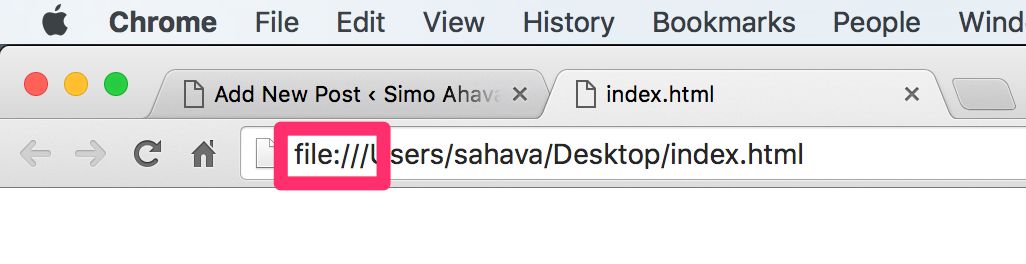
Every now and then you might be urged to run Google Tag Manager and/or Google Analytics locally, meaning without the benefit of a web server serving your files. In other words, you’re loading an HTML file from your computer in the web browser. You can identify a locally run file by the file:/// protocol in the address bar.

Now, deploying Google Tag Manager onto that file with the hopes of running Google Analytics requests locally isn’t quite simple. Well, actually, the deployment is fairly simple, but customizing it so that it actually sends useful hits requires some tweaking.

Read More…

Attribution in Enhanced Ecommerce Reports

Enhanced Ecommerce is a very useful set of reports in Google Analytics. They extend the standard Ecommerce funnel, which measures only purchases, and allow you to observe products from the very first impression, through various interactions, all the way to the purchase and even beyond, if the user wanted a refund. Google has some solid documentation on how to implement and interpret Enhanced Ecommerce, but if there’s one area that would deserve more illumination, it’s attribution.

Read More…

Content Dashboard With Klipfolio and Google Analytics

I have very little against Google Analyticsdefault dashboards. The reason I shy away from them is because they lack the type of customization I’ve come to expect from a dashboarding tool. On top of that, they only let you look at GA data, and I learned early on in my career that focusing on just one vertical is one of the cardinal sins you can make as an analyst.

Furthermore, over the years I’ve become more and more disenchanted with GA’s clunky user interface, and the less time I spend in it the better for my serotonin levels. In fact, GA’s excellent Core Reporting API combined with a platform like Tableau or Klipfolio to manage and manipulate the data stream has become invaluable in my everyday work.

Read More…

Measure Google Tag Manager Event Duration

Google Tag Manager is a great tool. Yeah, you came all the way to this article to read that truism. It also performs really well, loading at a sweet, swift pace even on a slow connection, thanks to pretty decent response times from Google servers. On top of that, the library itself loads asynchronously, meaning the container download doesn’t interrupt the browser as it tries to make sense of your messy HTML.

Read More…