Track Browsing Behavior in Google Analytics

Last updated 22 May 2019: Added expiration of currently open tabs.

In this article, Jethro Nederhof of Snowflake Analytics fame and I will introduce you to some pretty neat web browser APIs. The purpose of these APIs is to find out more about how the user navigated to the current page, and what’s going on with their browser tabs.
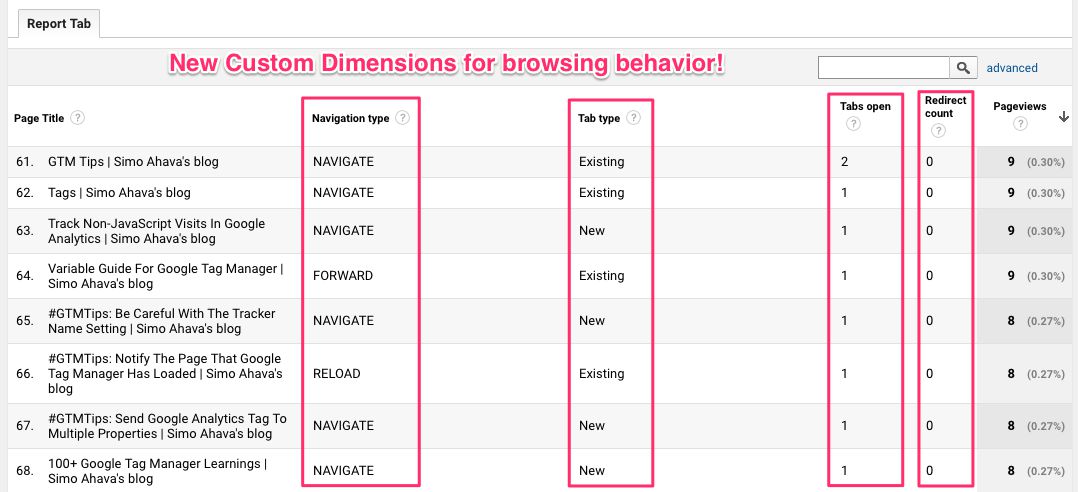
There are so many things you can do with this new information. You can build proper navigational path reports, rather than rely on the fuzzy and often incoherent flow reports in Google Analytics. You can identify how visitors interact with your content using browser tabs - a crucial bit of information if you want to make heads or tails of Google Analytics’ time on page metrics, for example. You can see how many redirects were involved in the current navigation action.

Read More…

Send Google Analytics Payload Length as Custom Dimension

Maybe you knew this, maybe you didn’t, but requests sent from your website (or app) to Google Analytics have a maximum size. Or, more specifically, the payload size (meaning the actual content body of the request) has a maximum.

This maximum size of the payload is 8192 bytes. This means, basically, that the entire parameter string sent to Google Analytics servers can be no longer than 8192 characters in length. The thing is, if the payload exceeds this, Google Analytics simply drops the hit. There’s no warning, no error, nothing. The hit just doesn’t get sent. If you are running the Google Analytics debugger browser extension, you can actually see a warning when the payload size is exceeded:

Read More…

Definition of Success

Agile analytics isn’t a novel concept in any shape or form. Things like feedback loops and process-oriented development seem to integrate flawlessly into the analytics paradigm, at least on paper. Heck, there’s even the Build-Measure-Learn framework for continuous development. It would be difficult to argue that analytics doesn’t have a role in something with measure in the name!

However, past three years of working at Reaktor, one of the world’s top agile technology houses, have introduced me to a whole new set of problems with integrating an “analytics mindset” into an agile workflow, or an “agile mindset” into the analytics process.

Read More…

Guide to Zones in Google Tag Manager 360

Last updated 13 March 2024: Clarified that you can add a trigger like Initialization – All Pages as a Custom Evaluation to give the Zone full access to page state.

Google Tag Manager supports loading multiple containers on the same page. It’s useful if you have multiple companies or organizations working on the same site, but for one reason or another (e.g. governance) you want to restrict access to your main container. In these situations, having the other party create their own container and adding it to the site is the best of bad options.

Read More…

Customize the Scroll Depth Trigger in Google Tag Manager

Last updated 9 March 2018 with some new tips.

The Scroll Depth trigger in Google Tag Manager has a lot going for it. Tracking how far users scroll down a given page has long since been recognized as an important cog in the engagement tracking machine, and there have been really great solutions for implementing scroll depth tracking for web analytics over the years.

With Google Tag Manager’s native Scroll Depth trigger, it’s tempting to think we now have a be-all end-all solution that covers all the bases. However, as with everything else in analytics, the native scroll depth trigger does require customization to provide you with relevant information about your content and the visitors interacting with it.

Read More…

CustomTask - The Guide

Last updated 4 September 2018

If you have been reading my blog articles over the past year, you might have noticed a disturbing trend. I’ve published 9 articles on customTask since the API was released. It might not sound like much, but I can’t think of a single feature in Google Analytics or Google Tag Manager that has so completely convinced me of its usefulness in such a short time.

The customTask API is a feature of the Universal Analytics library (used by Google Tag Manager’s tags, too). It lets you get and set values from and to the (Measurement Protocol) hit as it’s being generated. This is really useful for a couple of reasons, which I’ve covered in the previous articles, but I’ll go over them briefly in the beginning of this guide, too.

Read More…

Snowplow: Full Setup With Google Analytics Tracking

A recent guide of mine introduced the Google Analytics adapter in Snowplow. The idea was that you can duplicate the Google Analytics requests sent via Google Tag Manager and dispatch them to your Snowplow analytics pipeline, too. The pipeline then takes care of these duplicated requests, using the new adapter to automatically align the hits with their corresponding data tables, ready for data modeling and analysis.

While testing the new adapter, I implemented a Snowplow pipeline from scratch for parsing data from my own website. This was the first time I’d done the whole process from end-to-end myself, so I thought it might be prudent to document the process for the benefit of others who might want to take a jab at Snowplow but are intimidated by the moving parts.

Read More…

New Tools Released

Over the past few weeks, I’ve been coding like crazy. The three biggest outcomes of this frenzy have been this new blog design (switched finally away from WordPress and took the plunge back into the world static sites using Hugo), a new Google Sheets add-on for managing Google Tag Manager containers and assets, and a Slack integration in GTM Tools. In this article, I’ll quickly introduce the last two, as I’m writing a separate article about the site redesign.

Read More…

Add Client ID to Custom Dimension With Gtag.js

When Google released gtag.js, the new, global tracking library designed to (eventually) replace analytics.js, many Universal Analytics practitioners and users were confused (see e.g. Jeff’s great overview here). It seemed like gtag.js wasn’t really solving any immediate problem, since analytics.js had done a bang-up job with Universal Analytics tracking for all these years. However, gtag’s modus operandi is the ability to leverage the same semantic information (distributed across dataLayer!) across a number of Google products, starting with GA and AdWords.

Read More…

Send Event and Custom Dimension if Google Optimize Experiment Is Running

I really like Google Optimize. It has a fairly intuitive UI, setting up experiments is easy, and there’s integrations for both Google Tag Manager and Google Analytics built into the system. It’s still a JavaScript-based, client-side A/B-testing tool, so problems with flicker and asynchronous loading are ever-present (though this is somewhat mitigated by the page-hiding snippet).

One issue with the Google Analytics integration is the difficulty of creating segments for sessions where the users were actively participating in the experiment. In fact, there’s no specific signal in Google Analytics that tells you the NOW the user is “experiencing” an experiment. You’ll find the Experiment Name and Experiment ID dimensions, yes, but they have one drawback:

Read More…